
Open Subtitles
Open your project in Videfy Studio, then click Subtitles to choose a source and access subtitle tools.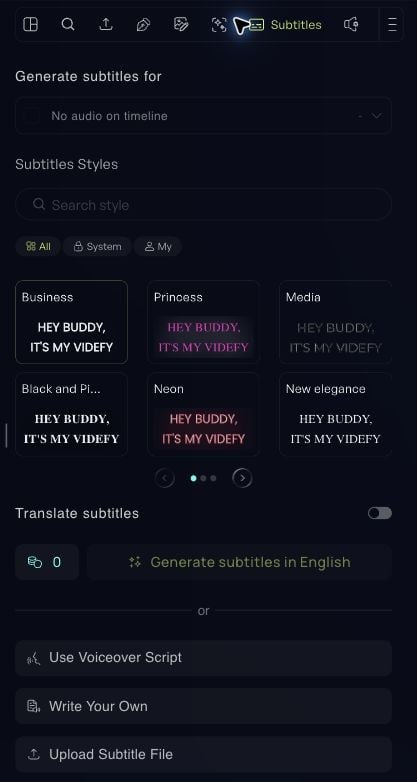
Generate from audio or video
- Choose the source under Generate subtitles for.
- Select the audio assets or video clips you want to transcribe.
- Review the selected time ranges and choose a subtitle style.
- To translate the spoken words, turn on Translate Subtitles and select the target language.
- Review the credit cost, then click Generate Subtitles.
Use a script, your own text, or a file
- Use Voiceover Script: Create subtitles from the narration script in your project.
- Write Your Own: Enter subtitle text manually.
- Upload Subtitle File: Import subtitles you already have.
Edit text and timing
Select a subtitle in the Subtitles panel, on the timeline, or on the canvas. Correct the text, then play the surrounding section to check its timing. Use the timeline to adjust when the subtitle appears and disappears. If you need to combine subtitle entries, select them and use the merge option. Review the combined text and timing afterward.Customize the style
Open the subtitle options menu and choose Edit Style. Select a preset or customize the appearance. You can adjust:- Font: Typeface, size, and text color.
- Background and shadow: Improve contrast against the video.
- Alignment and lines: Control how the text is arranged.
- Capitalization: Use uppercase, lowercase, or title case.
- Spacing: Adjust line height, letter spacing, and word spacing.
Hide or show subtitles
Use Hide Subtitles in the subtitle options menu to hide subtitles without deleting them. Hidden subtitles remain in your project but do not appear in the preview or exported video. Choose Show Subtitles from the same menu to make them visible again.Delete subtitles
To remove an individual subtitle, select it on the timeline, right-click, and choose Remove. You can also use Delete or Backspace while the subtitle clip is selected. To remove all subtitles, use Delete in the subtitle panel’s menu. Check the scope of the action before confirming.Review before export
Play your video and check:- Accuracy: Correct names, punctuation, and transcription errors.
- Timing: Keep subtitles aligned with the speech and allow enough reading time.
- Readability: Keep each subtitle short enough to read comfortably.
- Contrast and placement: Check light and dark frames, and leave space for the destination platform’s interface.
- Translation: Review translated text in context and make sure it fits the frame.