Understanding AI Generation Credits in Videfy
AI Generation Credits are used in Videfy when you create AI-generated content, including images, videos, voiceovers, and subtitles. Credits are required for each generation request. The number of credits used can vary depending on the type of content you generate, the model selected, the amount of content created, and the settings used.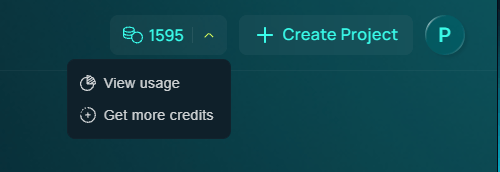
How AI Generation Credits Work
AI Generation Credits may be used for:- Images – Generating illustrations or visual assets for your scenes
- Videos – Generating video clips from prompts, images, or scene settings
- Voiceovers – Creating AI narration from your script
- Subtitles – Generating subtitles or captions for your video
View your credit balance
Your current credit balance is displayed in the top right corner of the screen. Click the dropdown arrow beside your credit count to access quick options:- View usage: See a breakdown of the credits in your plan and how many you have used
- Get more credits: Purchase additional credits
- Upgrade My Plan: Switch to a plan with a higher credit allowance
What Affects Credit Usage
Several factors can affect how many credits are required.Content Type
Different types of AI generation use different amounts of credits. In general:- Images use credits per generated image
- Videos use credits based on generation settings and duration
- Voiceovers use credits based on narration length, model, and voice settings
- Subtitles may use credits based on video or audio length
Quantity and Duration
Credits scale with the amount of content you generate. For example:- More images in one request use more credits
- Longer videos use more credits
- Longer voiceovers use more credits
- Longer videos or audio tracks may require more credits for subtitles
Models Used
Videfy uses AI models and third-party tools to generate content. Different models can have different generation costs. Because some models are provided by external services, credit requirements may change over time based on updates, pricing changes, or model availability.Generation Settings
The settings you choose can also affect credit usage. This may include:- The selected image or video model
- Number of outputs generated
- Video duration
- Voiceover model
- Narrator or voice settings
- Subtitle generation options
Getting More Credits
If you need more credits, you can upgrade your plan or purchase add-ons.Upgrade Your Plan
To upgrade your plan:- Go to Profile Settings
- Select Subscription & Billing
- Click My Plan
- Choose a plan with more AI Generation Credits
Buy AI Generation Credit Add Ons
To purchase additional credits:- Go to Profile Settings
- Select Subscription & Billing
- Click Add Ons
- Click the + icon to purchase additional credits